

Now lets Start the Real Fun^^
How to find Bugs ?#
- Static Analysis: look at the code without running it and find bugs (mistakes).
- Fuzzing: Give the program lots of unexpected inputs , If one input crashes the program, you may have found a bug (^^ cash ^^) .
imagine this:

Normal user:
	input : hello

fuzzer:
	input : A
	input : AAAAAAAA
	input : \xff\x00\x01
	input : 10000 random bytes
So what’s fuzzing? What is the concept??#
- In basic terms: Fuzzing is automatically giving a program lots of weird, unexpected, or random inputs to see if it breaks.
The concept =>#
- The following concept is translated From Frequently asked questions (FAQ)
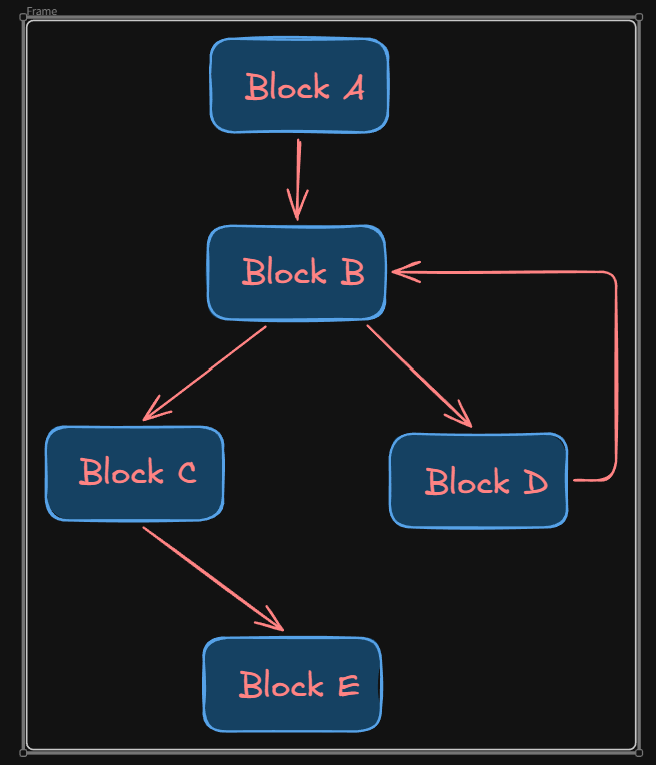
Documentation A program contains functions, functions contain the compiled machine code. The compiled machine code in a function can be in a single or many basic blocks. A basic block is the largest possible number of subsequent machine code instructions that has exactly one entry point (which can be be entered by multiple other basic blocks) and runs linearly without branching or jumping to other addresses (except at the end).
Example: The following A, B, C, D, E are the basic blocks:
function() {
  A:
    some
    code
  B:
    if (x) goto C; else goto D;
  C:
    some code
    goto E
  D:
    some code
    goto B
  E:
    return
}
An edge is then the unique relationship between two directly connected basic blocks (from the code example above), Every line between two blocks is an edge
Types of fuzzing :>#
Based on input Awareness:
- Dumb Fuzzer: know nothing , Just throws random data, and that makes it to miss the deep bugs
- Smart Fuzzer: Understands the input format, instead of random JPEG bytes, it creates almost valid JPEG files this makes it explore much more code
Based on input generation:
- Mutation-based: starts from valid files, and changes them slightly maybe bit by bit or byte. (like what AFL++ mainly does)
- Generation based: creates files from scratch using rules, instead of mutating a PDF, it builds a PDF according to its specification.
Based on knowledge of Target:
- White box: source code available , you can use every detail
- Black box: No source code , you can only observe the input > program > crash or not.
- Grey box: Most popular , no full source , but uses feedback like (code coverage) (AFL++ belongs here as well)
Based on Target: Different targets need different fuzzers. Examples:
target input File fuzzing PDFs, PNGs Network fuzzing Protocols Command-line fuzzing linux tools Kernel fuzzing syscalls or drivers Web fuzzing HTTP requests Firmware fuzzing target it via emulation or hardware interfaces Browser fuzzing HTML/JS/CSS Stateful fuzzing FTP, DHCP Windows fuzzing winAFL Always understand your target before choosing a fuzzer.
Instrumenting The Target#
- Instumetation is adding extra code into the binary during compilation often at specific points like before (basic blocks, function calls) to collect information and it makes the compiled program looks like this
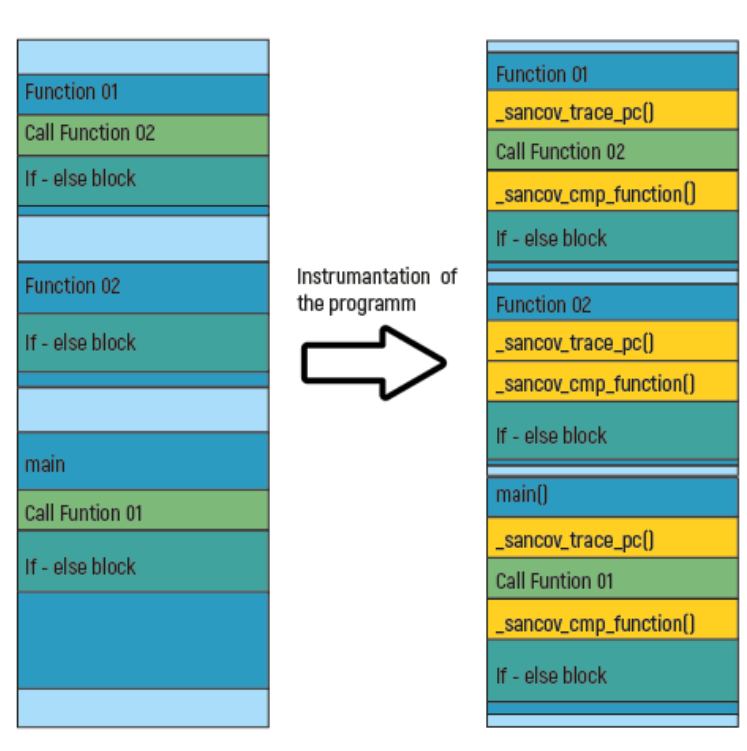
- This tracks which lines, basic blocks, or branches of code are executed by a given input.
Instrumenting Types#
- PCGUARD:
- Compiler:
afl-clang-fast - LLVM SanitizerCoverage
- Instrumentation during compilation
- Faster compile time
- Compiler:
- LTO (Recommended)
- Compiler:
afl-clang-lto - Instrumentation during linking
- Better optimization
- Usually best performance & coverage
- Compiler:
- GCC Plugin
- Compiler:
afl-gcc-fast - Uses GCC plugin
- Use only if Clang/LLVM isn’t available
- Compiler:
Sanitizers#
- Sanitizers insert runtime checks to detect bugs.
| Sanitizer | Detects |
|---|---|
| ASAN | Buffer overflow, UAF, OOB, NULL dereference |
| MSAN | Uninitialized memory reads |
| UBSAN | Undefined behavior |
| CFISAN | Invalid control flow / type confusion |
| TSAN | Thread race conditions |
| LSAN | Memory leaks |
- ASAN is the most commonly used during fuzzing.
- Sanitizers slow execution (ASAN ≈ 2–3× slower).
- Real fuzzing often runs:
- One instance with ASAN
- Other instances without sanitizers for speed.
Demo#
- Lets consider the following c program just to examine the basic usage of fuzzing and its idea
#include <stdio.h>
#include <stdlib.h>

int isBigPrime(int n) {
  if (n <= 5)
    return 0;
  for (int i = 2; i * i <= n; i++)
    if (n % i == 0)
      return 0;
  return 1;
}

int main(void) {
  char s[35];
  scanf("%s", s);

  char cnt[300] = {0};

  for (int i = 0; s[i]; i++) {
    cnt[s[i]]++;
    if (s[i] < 'x' || s[i] > 'z') {
      puts("unacceptable");
      return 0;
    }
  }

  if (isBigPrime(cnt['x']) && isBigPrime(cnt['y']) && isBigPrime(cnt['z']))
    abort();

  puts("Nice string");

  return 0;
}
- Input Limits: The program only accepts strings consisting of characters
x,y,z. If other characters are included, The program will output the unacceptable and exit normally. - Counting statistics: Counting the number of times each appears in the input string using
cntarrays - Trigger crash:
- The
isBigPrimefunction checks whether a number is greater than 5 prime (e.g. 7, 11, 13, 17 etc.) - The program executes
abortonly if the numberx,yandzare all prime numbers greater than 5 at the same time
- The
- Additional Bugs:
scanfdoes not limit input length, there is stack overflow
According to Selecting the best AFL++ compiler for instrumenting the target we will use afl-clang-lt as the compiler for instrumentation
afl-clang-lto ./test.c -o test
- we can provide initial simples for the inputs as well and put them in the
inputsdirectory
mkdir inputs
nano inputs/text

aaaaabbbbddddddd
helloworld
xxxyyyzzzzzzxxxyyy
xxxzzzyyy
- maybe none of them will crash the program , but the thing is AFL++ can mutate these samples on its own and find an input that can crash the program Now Lets Fuzz
afl-fuzz -i inputs -out/ ./test
and after just few seconds we will notice that we got some crashes, (aborts and stack overflow)
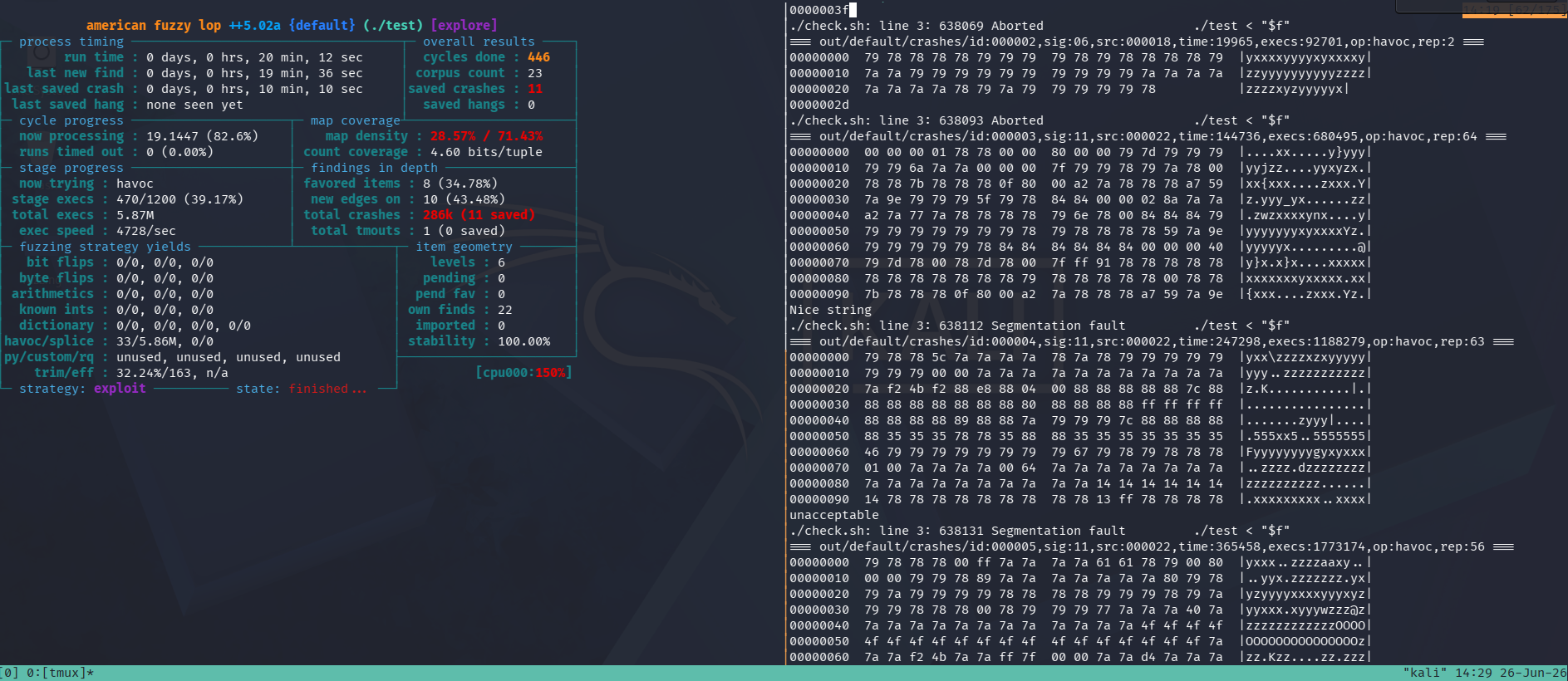
- The inputs that caused the program to crash can be found in
out/default/crashes - And I use this script to check the input and crashes
#! /usr/bin/env bash

for f in out/default/crashes/id:*; do
  echo "=== $f ==="
  hexdump -C "$f" | head
  ./test <"$f"
done
Fuzzing-Module#
Fuzzing-Module is the official AFL++ Beginners practice. there are three small exercises
Exercise 1#
- The source code =>
#include <iostream>
#include <stdio.h>
#include <stdlib.h>
#include <string.h>

using namespace std;

int main() {

  string str;

  cout << "enter input string: ";
  getline(cin, str);
  cout << str << endl << str[0] << endl;

  if (str[0] == 0 || str[str.length() - 1] == 0) {
    abort();
  } else {
    int count = 0;
    char prev_num = 'x';
    while (count != str.length() - 1) {
      char c = str[count];
      if (c >= 48 && c <= 57) {
        if (c == prev_num + 1) {
          abort();
        }
        prev_num = c;
      }
      count++;
    }
  }

  return 0;
}
- okay I will use the
afl-clang-lto++as the instrumentation
CC=afl-clang-lto CXX=afl-clang-lto++
cmake ..
make
- First lets analyze a few places that can cause a crash
str[0] == \x00str[str.length() - 1] == \x00- The next read num is one greater than the prev one example
12 EOF
- okay now As required by the exercise 1 we will generate 5 seeds using this script:
#!/usr/bin/env bash mkdir seeds for i in {0..4}; do dd if=/dev/urandom of=seeds/seed_"$i" bs=64 count=10 done - now lets fuzz
afl-fuzz -i seeds -o out -m 0 -d -- ./build/simple_crash
After a few seconds I found 3 crashes
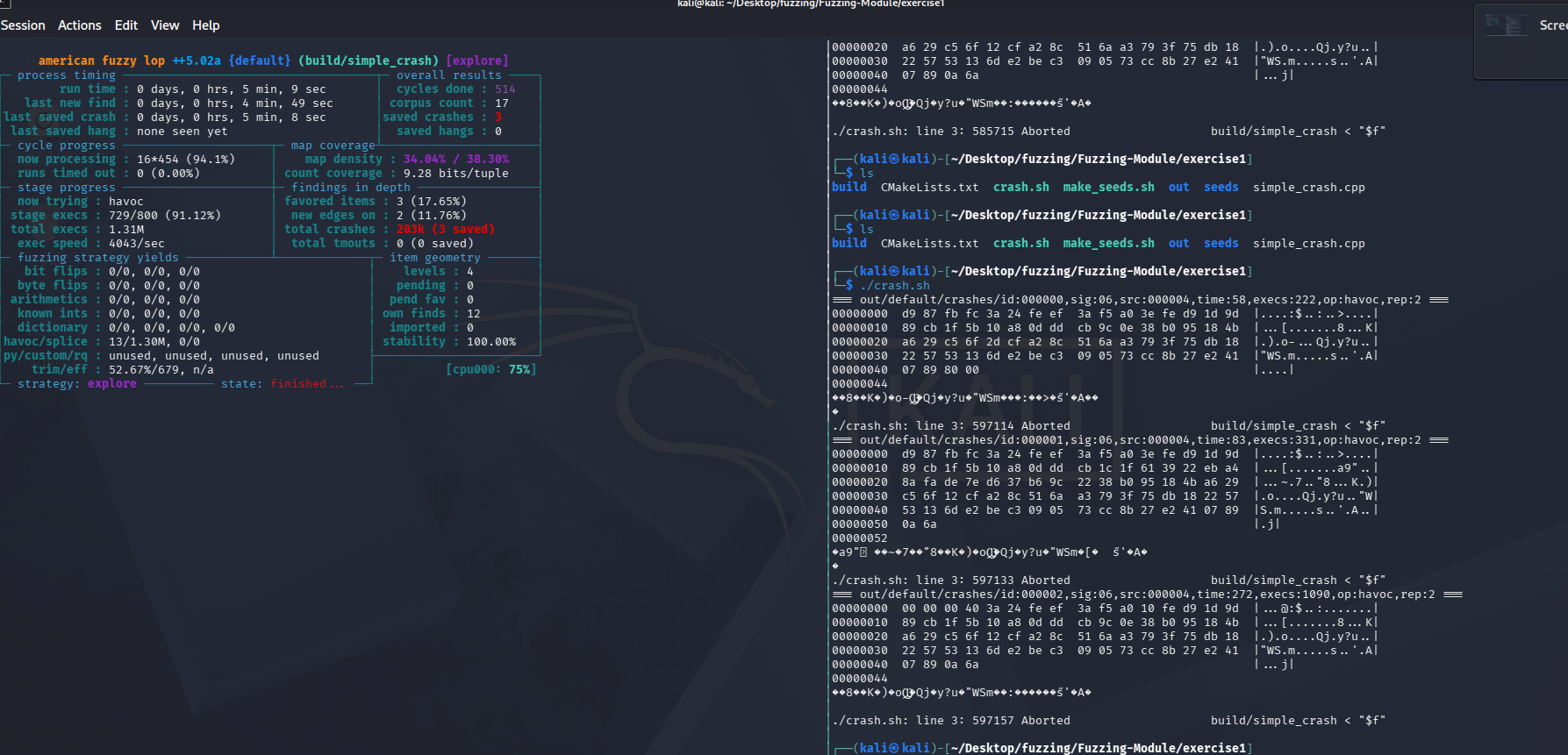
- it feels amazing when i see those crashes XD
Note: crashes analyses
- okay the first crash
id:000000this matches our second case- the second crash
id:000001matches our third case- and the third one
id:000002matches our first case
As you surely notice the fuzzer didn’t detect our last case which is EOF
This is mainly caused by its result this specific input EOF will cause undefine Behaviour
Possible results:
- Crash
- No crash
- Garbage value
- Different behavior every run
Because it is not reproducible, AFL++ usually marks it as flaky and discards it.
- so we need to enhance its crash performance somehow to make it more certain like this maybe:
  if(str.length() == 0)
	  abort();
- or we can use the AddressSanitize
ASANand UndefinedBehaviorSanitizerUBSAN
Note: Compiling with sanitizer
cmake -S . -B build \
-DCMAKE_C_COMPILER=afl-clang-lto \
-DCMAKE_CXX_COMPILER=afl-clang-lto++ \
-DCMAKE_C_FLAGS="-O1 -g -fno-omit-frame-pointer -fsanitize=address,undefined" \
-DCMAKE_CXX_FLAGS="-O1 -g -fno-omit-frame-pointer -fsanitize=address,undefined"
Why these flags?
-O1small optimization just to make debugging easier-galso makes debugging with gdb much easier it tells u exactly at which line in the source the binary crashed-fno-omit-frame-pointerProduces accurate stack traces.fsanitize=address,undefinedenables both ASan and UBSan.Okay before fuzzing we need to set these vars
export ASAN_OPTIONS=abort_on_error=1:symbolize=0:detect_leaks=0
export UBSAN_OPTIONS=abort_on_error=1
WHY?
symbolize=1it printssimple_crash.cpp:15instead of just an address “much easier to debug”print_stacktrace=1prints the call stack where the bug occurred And for better Debugging Use this oneexport ASAN_OPTIONS=abort_on_error=1:symbolize=1:detect_leaks=0 export UBSAN_OPTIONS=abort_on_error=1:print_stacktrace=1
Exercise 2#
- This one is easy , the only condition to abort is to enter
fflthis will trigger it
} else if (input[i] == 'l') {
    if (crew.num == 0) {
        abort();
    }
    land();
}
- I used the same pervious seed ( I know its a bit missy But I like it XD)
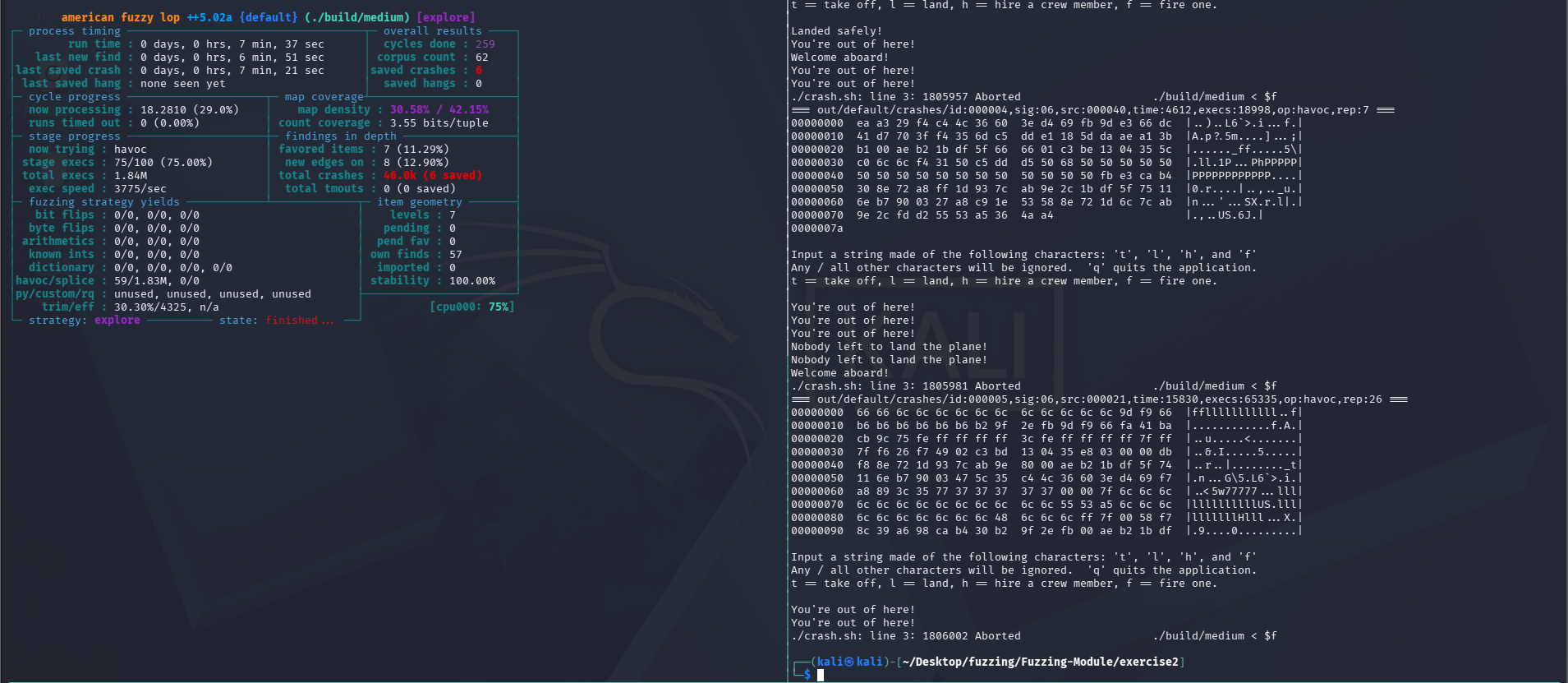
- by observing the crashes they all about the
fflbut with different paths in the code
Exercise 3#
- Hmmmm Too much code in here so we will use Sourcetrail as the guide says
- okay Next lets search for the abort points
choose_colorIf we entered a pure numbermain_altinput negative numbermain_airspeedinput negative numberfuel_capinput negative numbercheck_altif thealtis less than 0check_fuelif thefuelis less than 0check_speedif thespeedis less than 0
Note: Sourcetrail in such projects that have lots of files, headers, classes sourcetrail is a really big help for us it helps us to trace the functions and map it in a very easy way
- In this exercise we need to use a really important technique create a slice its basically that we want to narrow down the code that will be running as much as possible. so instead for example fuzzing a full drone system we will slice it to just fuzz the GPS module or something
- For the slice, you can comment out some of the code in the target to ignore features that you are not interested in fuzzing.
This exercise gives us a template for a slice specs_slice so we will fuzz only the specs class and test the choose_color function specifically
/*
 *
 *
 * This file isolates the Specs class and tests out the
 * choose_color function specifically.
 *
 *
 *
 */

#include "specs.h"

int main(int argc, char** argv) {
    // In order to call any functions in the Specs class, a Specs
    // object is necessary. This is using one of the constructors
    // found in the Specs class.
    Specs spec(505, 110, 50);
    // By looking at all the code in our project, this is all the
    // necessary setup required. Most projects will have much more
    // that is needed to be done in order to properly setup objects.

    // This section should be in your code that you write after all the
    // necessary setup is done. It allows AFL++ to start from here in
    // your main() to save time and just throw new input at the target.
    #ifdef __AFL_HAVE_MANUAL_CONTROL
        __AFL_INIT();
    #endif

    spec.choose_color();
    //spec.min_alt();

    return 0;
}
- We can set the fuzz entry by defining
__AFL_HAVE_MANUAL_CONTROL,__AFL_INIT()tells AFL++ to start fuzzing only after your program’s initialization is complete, so it skips one-time setup and focuses on the target code
We will test chosse_color first , we know if we entered a pure number it will collapse so lets fuzz and see
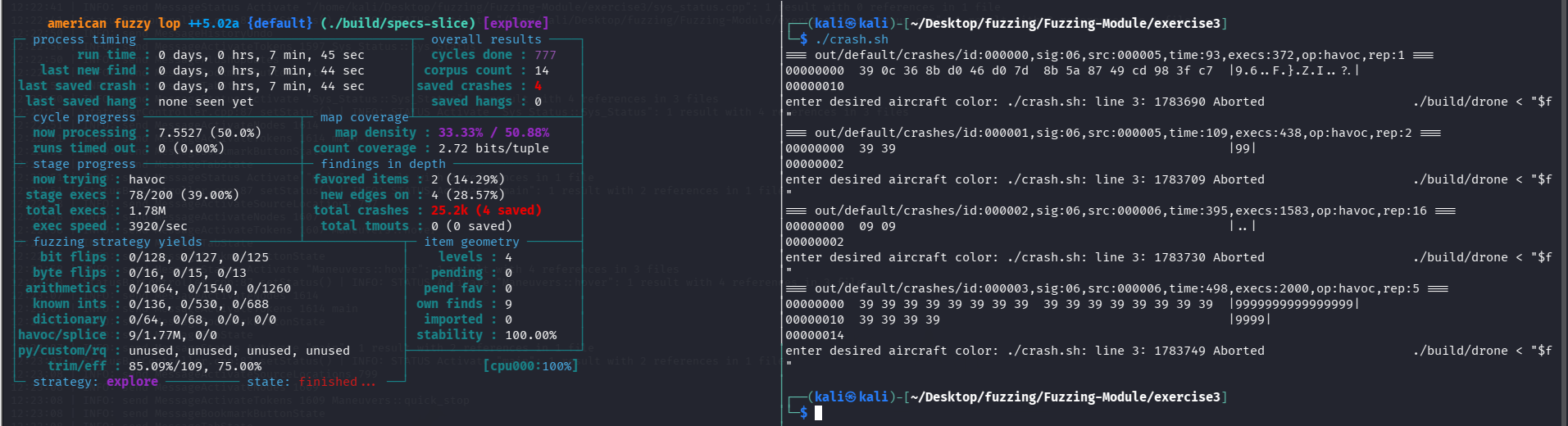 wooh more crashes than i expected, lets analyze them.
- okay the first crash input is like this
\x39\x0c\x36we know thatcinstops at white space so it will take the first digit9and ignores the others , so the digit now aborts the program - the second and fourth one are simple they are pure digits so it will crash the program
- the third one its
\x09\x09its\t\tso when it tries to saves an empty color so this loop right here will return true , and returning true causes a crashstd::cin >> color; if (isNumber(color)) abort(); bool Specs::isNumber(std::string str) { for (int i = 0; i < str.length(); i++) { if (isdigit(str[i]) == 0) Return to False; } return true; }
Lets fuzz one more function min-airspeed
- first i used this slice
#include "specs.h"

int main(int argc, char** argv) {
    Specs spec(505, 110, 50);
    #ifdef __AFL_HAVE_MANUAL_CONTROL
        __AFL_INIT();
    #endif

    spec.min_airspeed();

    return 0;
}
Don’t forget to add this line in the CMakeLists.txt
add_executable(min-airspeed-slice min-airspeed-slice.cpp specs.cpp)
and then build again
- I fuzzed this function specifically to see how the exec speed gonna increase since this function has a loop and may ask for more than one input in different paths.
void Specs::min_airspeed() {
  bool out_of_bounds = true;
  std::cout << "enter aircraft minimum airspeed:";
  std::cin >> speed;
  do {
    out_of_bounds = false;
    if (speed < 0)
      abort();
    if (speed < 100) {
      std::cout << "too low. please re-enter:";
      std::cin >> speed;
      out_of_bounds = true;
    } else if (speed > 200) {
      std::cout << "too high. please re-enter:";
      std::cin >> speed;
      out_of_bounds = true;
    }
  while (out_of_bounds);
}
- As I expected the exec speed was too slow
60/secbut we got some crashes
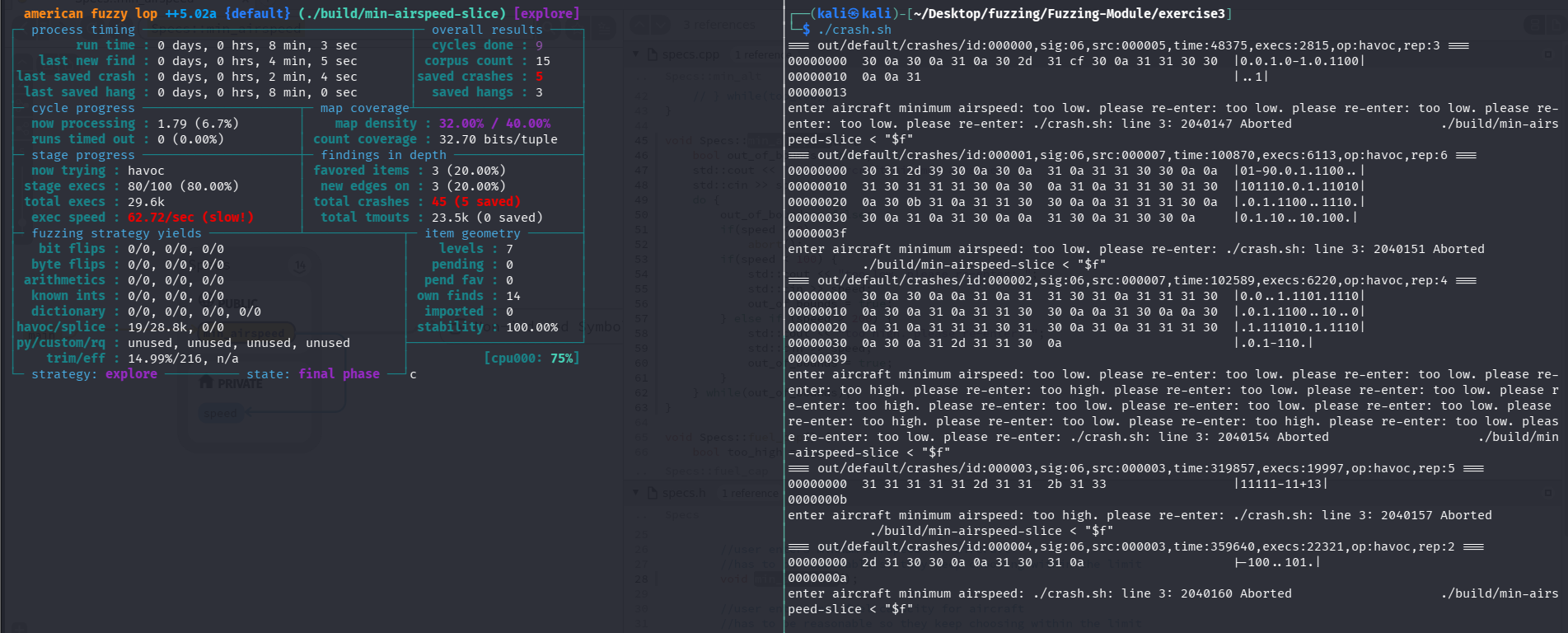
- The fourth crash is a bit interesting the input
11111-11+13crashes the program becausestd::cin >>automatically splits the input while reading integers It first reads11111and leaves-11+13in the input buffer since11111is greater than200the program asks for another input the nextstd::cin >>speed reads-11from the remaining buffer and stops before the+now speed is negative so the program reachesabort()
okay that’s it , I won’t fuzz the other function cause they are easier and it will be a waste of time to fuzz them.